

Sub-user dashboard
Sub-users can now sign in to their own dashboard.
Released September 2026.
Sub-users created with Programmatic + Dashboard access now get their own dashboard in the Zata console. It shows only the buckets, regions and permissions that the account owner gave them. They sign in on the same sign-in page as the owner, with the password they set when they accepted their invitation.
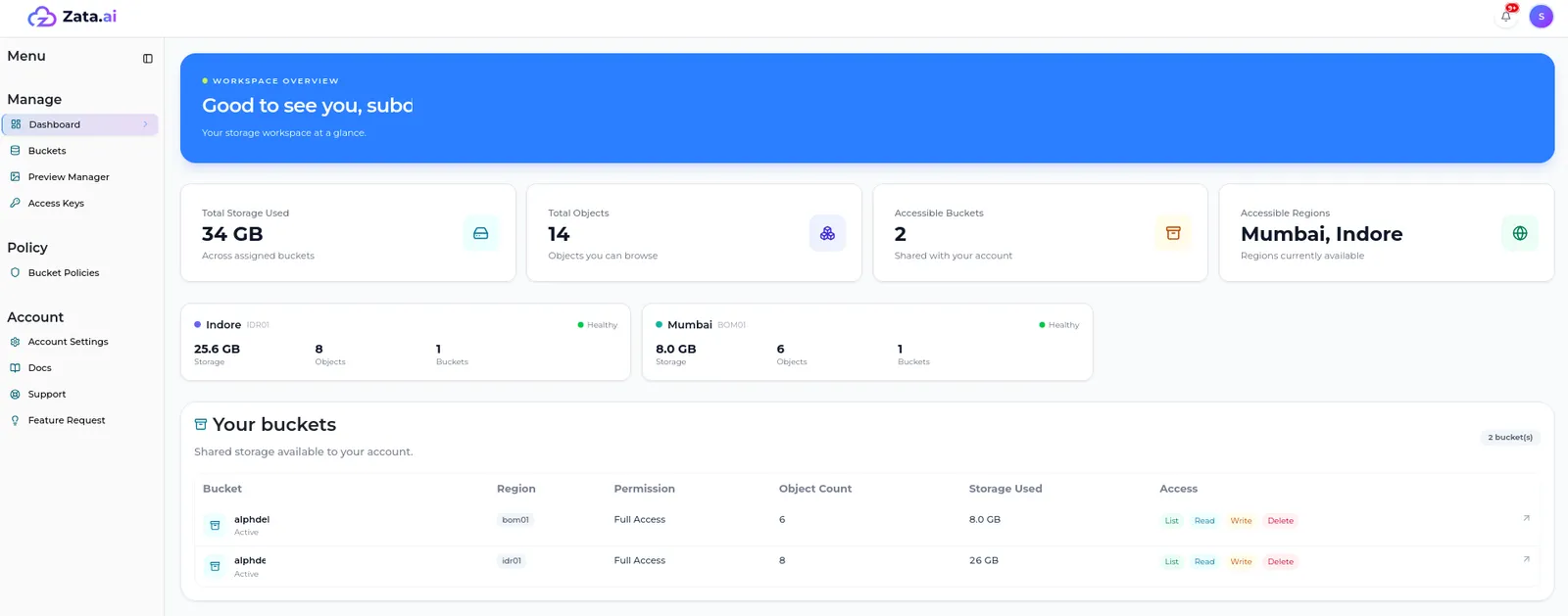
What sub-users can do
Asking for more access
In Bucket Policies, a sub-user selects Request Policy to ask for more actions on a bucket. The account owner approves or rejects the request in their own console. The sub-user sees the result on the Requested and Rejected tabs.
What stays with the account owner
Sub-users can’t create buckets, create or delete access keys, see billing, or invite and manage other sub-users. Anything a sub-user is missing, such as a bucket, a region or a permission, the account owner grants in the console.
Sub-users with Programmatic access only don’t change: they have no dashboard and keep using their access keys with S3 tools.
Learn more
- What sub-users see: a walk-through of every part of the sub-user dashboard.
- Create a sub-user: choose Programmatic + Dashboard access.
- Invitations: how a sub-user sets their password and signs in.